April 22, 2026
12 min read
5 Design Elements That Shape User Behavior
Every design decision is a behavioral decision. The colors you choose, the space you leave, the typeface you set. None of these are neutral. Each one triggers perceptual and emotional responses that influence how users feel, what they notice, and whether they act. Here's how to use the five foundational design elements as behavioral levers rather than aesthetic choices.
Your website is often someone's first encounter with your brand. That first impression happens in roughly 50 milliseconds, before a single word is read (Lindgaard et al., 2006). In that half-second, the visual cortex has already made judgments about trustworthiness, professionalism, and relevance based entirely on design elements.
Get these elements right, and that snap judgment becomes the foundation of a relationship. Get them wrong, and no amount of compelling copy will recover the lost trust.
1. Color
Every hue carries an emotional payload
Color psychology is the foundation of visual identity and one of the most powerful behavioral tools at a designer's disposal. Different wavelengths of light trigger measurably different physiological and emotional responses. Red genuinely increases heart rate and arousal (Elliot & Maier, 2014). Blue promotes calm and signals trustworthiness, which is precisely why nearly 40% of Fortune 500 companies use it in their branding.
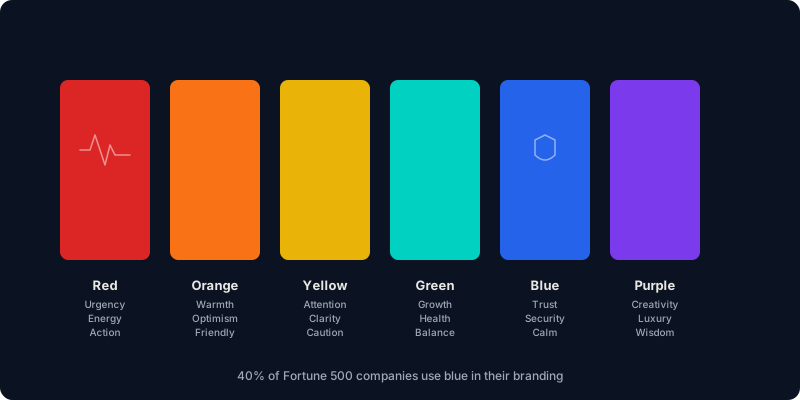
But here's what most articles about color psychology miss: context determines impact. Red doesn't universally mean "danger." On a food delivery app, it triggers appetite. On a fintech platform, it signals loss. The same hue produces opposite emotional responses depending on where it appears and what surrounds it.
Color also intersects with accessibility in ways that directly affect conversion. Roughly 8% of men and 0.5% of women have some form of color vision deficiency, most commonly affecting red-green discrimination. Blue is the safest high-contrast choice across all forms of color blindness, which is one reason (beyond trust signaling) that it dominates in enterprise and financial interfaces.
At Schemata Creative, we use color strategically, not decoratively. On this very site, our teal (#00D1C1) serves a single purpose: it marks actionable elements and important information. Everything else is navy or neutral. When color is rare, it's powerful. When it's everywhere, it's noise.
"The most effective color palettes aren't the most beautiful ones. They're the ones where every color has a job, and no color is unemployed."
How we apply it: We define color roles before choosing hues. Primary action, secondary action, success, warning, information, and surface. Each gets one color. CTAs get the highest-contrast color in the palette, isolated from surrounding elements (Von Restorff Effect) to maximize click-through. We test every color pairing against WCAG AA contrast ratios. Beauty that fails accessibility fails conversion.
2. Spacing
The most undervalued element in design is the one you can't see
White space, or negative space, is the breathing room between and around elements. It's often the first thing stakeholders want to fill ("Can't we put something there?") and the last thing designers should compromise on.
Research from the Wichita State University Human Factors Institute found that increased white space around text improves comprehension by nearly 20% (Lin, 2004). The mechanism is cognitive load, not subjective preference. When elements are crammed together, the visual system has to work harder to separate, parse, and process them. Spacing does that work for free.
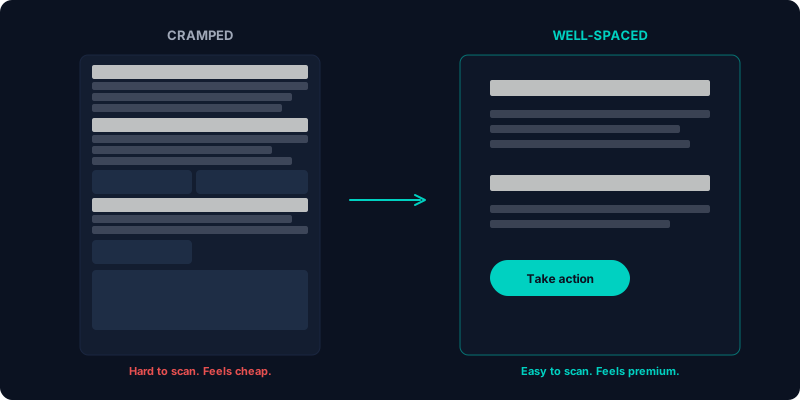
Spacing also encodes trust signals. Studies on web credibility consistently show that cluttered designs are perceived as less trustworthy than spacious ones (Fogg et al., 2001). This is particularly critical in healthcare, finance, and legal products, domains where trust is a prerequisite for engagement.
The practical reality is that most users skim rather than read. Eye-tracking studies from the Nielsen Norman Group confirm that users consume roughly 20% of the text on a given page. If your content isn't structured for scanning, with clear spacing between sections, generous line-height, and visual breaks, you're designing for a reading behavior that doesn't exist.
How we apply it: We use a 4px spacing scale (4, 8, 12, 16, 24, 32, 48, 64, 96) with semantic tokens. Related elements get tight spacing (8–12px). Separate concepts get generous spacing (32–64px). The ratio between internal padding and external margin communicates grouping (Gestalt proximity) without needing borders or boxes. We also set line-height inversely proportional to line length. Narrow columns get tighter leading, and wide columns get more.
3. Layout
Spatial structure is cognitive scaffolding
Layout determines how users understand what's related, what's important, and what to do next. A well-structured layout reduces cognitive load by providing a spatial framework that the brain can navigate intuitively. A poor layout forces users to build their own mental map, which is effortful and error-prone.
Research on "cognitive landscaping" (Resnick & Sanchez, 2004) demonstrates that layout directly impacts users' sense of control. When spatial organization aligns with mental models, users feel confident. When it doesn't, they feel lost, and lost users don't convert.
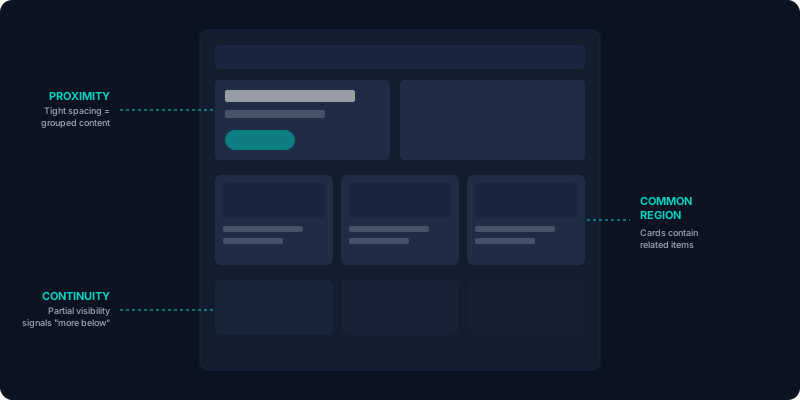
Every Gestalt principle manifests in layout decisions:
- Proximity determines grouping. A heading, description, and CTA spaced tightly together read as a single unit, no border needed.
- Common region creates containment. Cards, panels, and sections use background color or subtle borders to signal "these things belong together."
- Continuity guides the eye. Elements arranged along an axis (horizontal scroll, vertical timeline) create a reading path the eye follows naturally.
- Symmetry creates balance and trust. Asymmetry creates tension and interest. Both are tools, and neither is inherently better.
In the most effective layouts, spatial organization carries so much communicative weight that the content becomes easier to process before users even start reading.
How we apply it: We design layouts that pass the "squint test." If you blur the screen, the groupings, hierarchy, and reading path should still be clear. We use CSS Grid and auto-fit patterns for responsive layouts that adapt to content width rather than arbitrary breakpoints. And we build from the content outward, not from the grid inward. The structure should serve the content, not constrain it.
4. Typography
Letterforms shape perception before a single word is read
Typography is one of those design elements that everyone sees and almost no one consciously evaluates. That's precisely what makes it powerful. It operates below the threshold of conscious attention, shaping perception of brand personality, content credibility, and reading effort.
Serif typefaces signal tradition, authority, and editorial rigor, which is why newspapers, law firms, and academic institutions favor them. Sans-serif typefaces feel modern, clean, and approachable. Script and decorative faces communicate personality but risk sacrificing legibility. None of these associations are arbitrary; they're the accumulated result of decades of cultural exposure.
Font choice also has a measurable impact on reading speed. A 2022 study by Wallace et al. found substantial individual differences in reading speed across typefaces, with up to 35% variation between the fastest and slowest fonts for a given reader. Age was the strongest predictor: older users read significantly faster with larger, more open typefaces. The study recommended adjusting copy length by 11% or more for audiences over 50.
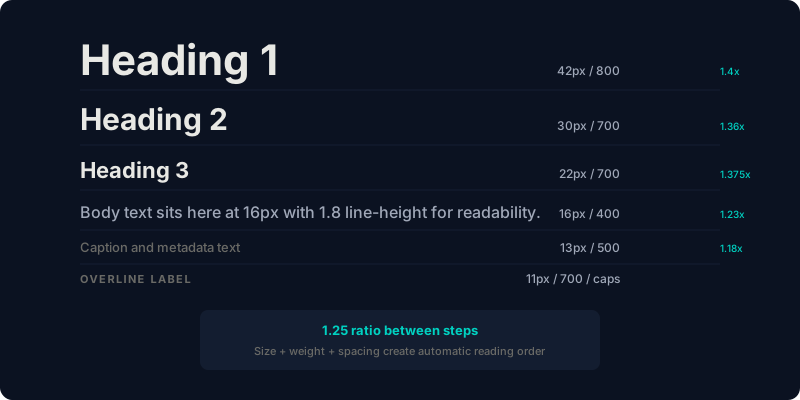
Beyond typeface selection, typographic hierarchy is one of the most reliable ways to implement visual hierarchy (see our article on psychology principles). A well-designed type scale, with at least a 1.25 ratio between steps, creates an automatic reading order that works even when users are skimming.
Size also interacts with Fitts's Law and the Von Restorff Effect. Large numerals in social proof sections ("40+ clients", "96% retention") command attention disproportionate to their content weight. They work because they break the typographic rhythm. A large bold number among body text is inherently distinctive.
How we apply it: We choose typefaces based on brand personality and audience demographics, not trend. We use a modular scale with fluid sizing (CSS clamp) for headings and fixed rem scales for product UI. Body text never exceeds 65–75 characters per line, because line length directly affects reading comprehension and fatigue. And we always test contrast ratios on body text. The most beautiful typeface in the world is useless if it's light gray on white.
5. Shapes
Geometry speaks a language the conscious mind doesn't hear
Shapes carry subconscious associations that influence how users perceive your brand and navigate your interface. Research in environmental psychology and visual perception has documented consistent emotional responses to geometric forms across cultures (Bar & Neta, 2006).

The fundamental associations:
- Circles and ovals suggest harmony, inclusion, and completeness. No sharp edges means no perceived threat. This is why profile pictures are circular, and why "community" features tend to use rounded UI elements.
- Squares and rectangles communicate stability, structure, and reliability. They're the backbone of card-based layouts and grid systems. They're predictable, orderly, and trustworthy.
- Triangles convey direction, power, and dynamism. A triangle pointing right universally means "play" or "forward." Pointing upward, it suggests growth. These are among the most action-oriented shapes in design.
- Organic curves feel natural, human, and calming. Waves, flowing lines, and irregular contours evoke water, landscape, and organic growth, making them useful for brands that want to feel approachable rather than corporate.
Shapes also serve as wayfinding tools. Arrows guide the eye along a path. Circular progress indicators suggest completion. Chevrons signal expandable content. These are functional communication devices that work across language barriers.
Bar and Neta's research (2006) found that people consistently prefer curved objects over angular ones and rate curved shapes as more pleasant and less threatening. This has practical implications for button design (rounded corners outperform sharp corners in click-through rates), card styling, and overall interface tone.
How we apply it: We align shape language with brand personality and user context. A fintech product for institutional traders gets angular, structured geometry that signals precision. A wellness app gets organic curves that signal calm. We also carry shape motifs from logos through the entire interface. When a brand's visual language is internally consistent, users develop procedural familiarity that reduces cognitive effort across every touchpoint.
Design elements aren't independent. They're an orchestra
The most effective interfaces don't excel at one design element. They harmonize all five. Color reinforces hierarchy. Spacing groups related content. Layout follows Gestalt principles. Typography establishes reading order. Shapes guide attention and encode brand personality.
When these elements work together coherently, the result feels effortless to the user, which is the whole point. The best interfaces don't feel designed. They feel obvious. And that feeling of obviousness is the product of hundreds of deliberate decisions, each grounded in how the human brain actually processes visual information.
Test everything. Measure the impact. Then test again. The principles are stable, but their application is always context-dependent. What works for an e-commerce checkout won't work for a meditation app. The science gives you the framework. Your users give you the data.
References
- Lindgaard, G., Fernandes, G., Dudek, C., & Brown, J. (2006). Attention web designers: You have 50 milliseconds to make a good first impression! Behaviour & Information Technology, 25(2), 115–126.
- Elliot, A. J., & Maier, M. A. (2014). Color psychology: Effects of perceiving color on psychological functioning in humans. Annual Review of Psychology, 65, 95–120.
- Lin, D. Y. M. (2004). Evaluating older adults' retention in hypertext perusal: Impacts of presentation media as a function of text topology. Computers in Human Behavior, 20(4), 491–503.
- Fogg, B. J., Marshall, J., Laraki, O., et al. (2001). What makes web sites credible? A report on a large quantitative study. Proceedings of the SIGCHI Conference on Human Factors in Computing Systems, 61–68.
- Nielsen, J. (2008). How little do users read? Nielsen Norman Group.
- Wallace, S., Bylinskii, Z., Dobres, J., et al. (2022). Towards individuated reading experiences: Different fonts increase reading speed for different individuals. ACM Transactions on Computer-Human Interaction, 29(4), 1–56.
- Resnick, M. L., & Sanchez, J. (2004). Effects of organizational scheme and labeling on task performance in product-centered and user-centered retail web sites. Human Factors, 46(1), 104–117.
- Bar, M., & Neta, M. (2006). Humans prefer curved visual objects. Psychological Science, 17(8), 645–648.
Want us to audit your design elements?
We analyze how color, spacing, layout, typography, and shape are working for (or against) your conversion goals.
Book a behavioral audit