April 28, 2026
8 min read
Cognitive Load Is Killing Your Conversion Rate
Your users aren't lazy, indecisive, or confused. They're cognitively overloaded. And it's costing you more conversions than any broken funnel ever could. Here's the science behind why, and five patterns we use at Schemata Creative to fix it.
The invisible bottleneck
In 1988, psychologist John Sweller introduced cognitive load theory, the idea that human working memory has a finite capacity, and when a task exceeds that capacity, performance collapses. Not degrades. Collapses.
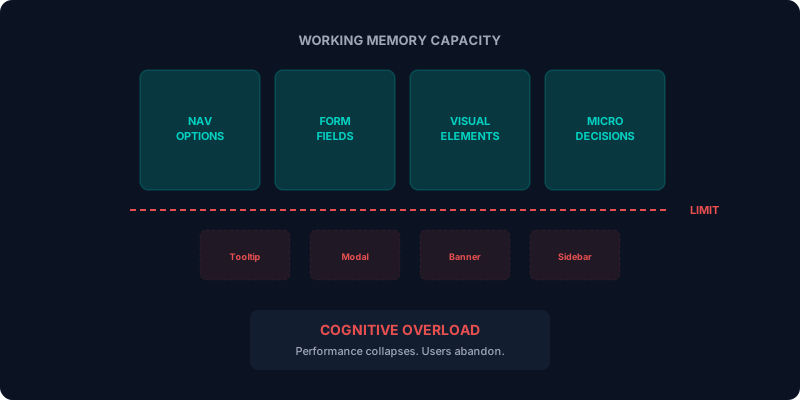
Working memory holds roughly 4 chunks of information at a time. Every form field, navigation option, visual element, and micro-decision your interface presents consumes a chunk. When users hit their limit, they don't think harder. They abandon.
The effect is measurable. In our work with Coinbase, we cut 45% of form fields from their business onboarding flow. Applications increased by over 10,000. The product didn't change. The cognitive load did.
Three types of cognitive load
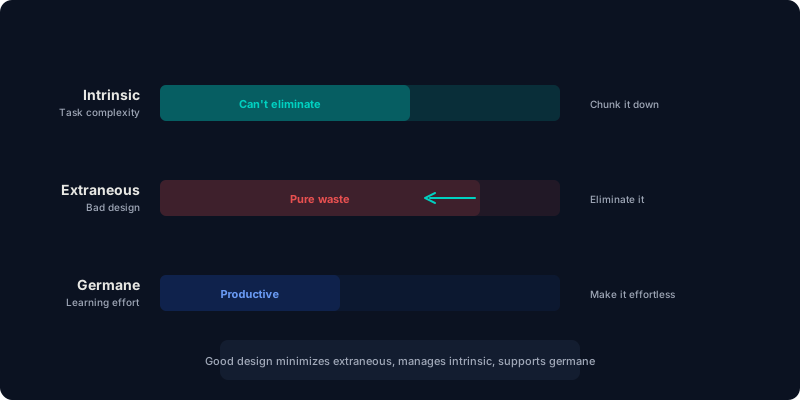
Sweller identified three distinct types. Understanding which one you're inflating is the key to fixing it.
1. Intrinsic load
The inherent complexity of the task itself. Choosing health insurance is intrinsically complex. Picking a username is not. You can't eliminate intrinsic load, but you can chunk it by breaking a complex task into smaller, sequential decisions so users only hold one chunk in working memory at a time.
2. Extraneous load
Unnecessary cognitive effort imposed by bad design. Confusing labels, cluttered layouts, inconsistent patterns, mystery-meat navigation. This is pure waste. Every pixel of extraneous load is a conversion leak, and it's entirely under your control.
3. Germane load
The productive effort of building mental models, or learning how your interface works. Good design makes this effortless through familiar patterns, clear affordances, and consistency. When a user says "this just makes sense," they're describing low germane load.
"The goal isn't to make interfaces simple. It's to make complex tasks feel simple. That distinction changes everything about how you design."
Five patterns that reduce cognitive load
These aren't theoretical. We've applied each one at Fortune 100 scale and measured the impact.
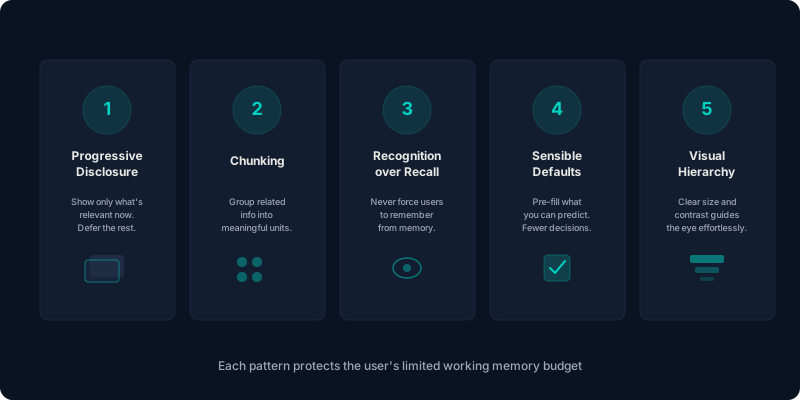
1. Progressive disclosure
Show only what's relevant to the current decision. Everything else is hidden until it matters. When we redesigned Intuit's expert platform, we moved from a dashboard that showed 40+ data points simultaneously to one that surfaced 6, with the rest available on demand. Task completion improved by 30%.
2. Chunking
Group related information into meaningful units. A 12-field form feels overwhelming. Four groups of 3 fields (Personal, Company, Preferences, Confirmation) feels manageable. The information is identical. The cognitive experience is completely different.
3. Recognition over recall
Never force users to remember information from a previous screen. Persist context. Show selections. Use visual cues that trigger recognition rather than requiring active recall. Recognition is cognitively cheap; recall is expensive.
4. Sensible defaults
Pre-fill what you can predict. Default selections reduce the number of active decisions a user has to make. Every decision you eliminate is a chunk of working memory freed up for the decisions that actually matter.
5. Visual hierarchy
When everything is visually equal, the brain has to work harder to determine importance. A clear size, weight, and contrast hierarchy tells the eye where to look first, second, third. It turns a cognitively demanding scan into an effortless flow.
The counterintuitive truth
Teams often resist removing features or information because "users might need it." But the research is unambiguous: presenting everything guarantees that nothing gets used well. The paradox of choice (Schwartz, 2004) shows that more options lead to worse decisions and lower satisfaction.
The highest-converting interfaces we've ever built aren't the ones with the most features. They're the ones that ruthlessly protect the user's cognitive budget and spend it only on what matters.
Applying this to your product
Start with an audit. Walk through your critical path (signup, onboarding, checkout, whatever your conversion event is) and count every decision, every piece of information, every visual element competing for attention. Then ask: what can be deferred, defaulted, or removed entirely?
The answer is almost always "more than you think."
Want a behavioral audit of your product?
We identify exactly where cognitive overload is costing you conversions, and how to fix it.
Start a conversation