April 30, 2026
14 min read
8 Psychology Principles That Drive Action in Web Design
Why do people click one button and ignore another? Why do some checkout flows feel effortless while others feel like filing taxes? The answer isn't in your analytics. It's in the research literature. After a decade of applying behavioral psychology at Meta, LinkedIn, Coinbase, and Intuit, these are the eight principles we return to on every engagement. They're not trends. They're how the human brain works.
User research is indispensable. But it has a blind spot: people can't always articulate why they do what they do. Much of human decision-making happens below the threshold of conscious awareness, in perceptual shortcuts, cognitive heuristics, and emotional reflexes that evolved long before screens existed.
The principles below aren't theoretical. We've tested each one at Fortune 100 scale, measured the impact, and refined how we apply them. They're the behavioral backbone of every interface we design.
1. Hick's Law
Too many options doesn't mean more freedom. It means paralysis
In 1952, psychologists William Edmund Hick and Ray Hyman demonstrated something that should be obvious but isn't: the time it takes to make a decision increases logarithmically with the number of options. Double the choices, and decision time compounds.
We see this constantly in product work. A navigation with 14 items. A dashboard showing 40 metrics simultaneously. A settings page with every toggle visible at once. Teams add these options with good intentions ("users might need it") without realizing they're taxing the one resource users can't replenish: cognitive bandwidth.
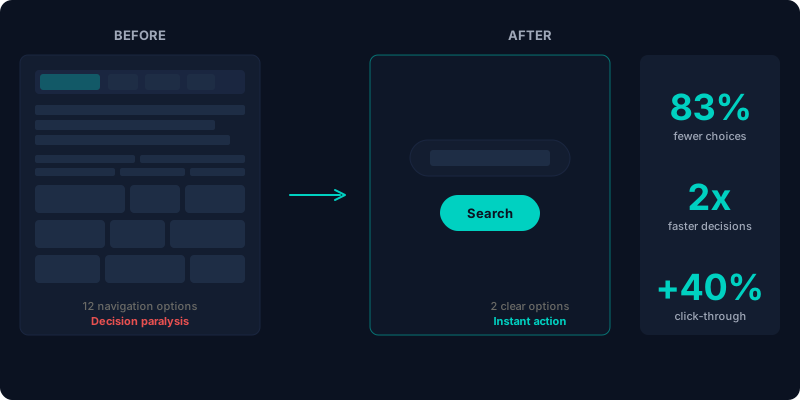
Compare Google's homepage from 2004 to today. They went from a dozen navigation links to essentially two: the search bar and a few contextual options. They didn't remove capability; they moved it to where it's contextually relevant.
The antidote to Hick's Law isn't removing features. It's progressive disclosure, showing only what's relevant to the current decision and deferring everything else. When we redesigned Coinbase's business onboarding, we cut 45% of visible form fields by revealing them only when contextually relevant. The information collected was identical. Applications increased by over 10,000.
Filters serve the same function for large catalogs. A retailer with 50,000 products isn't going to reduce their inventory, but a well-designed filter system turns an overwhelming catalog into a curated shortlist. The cognitive load shifts from "browse everything" to "refine once."
"The Paradox of Choice isn't just academic. When users take too long to decide, they don't choose the best option. They choose nothing."
How we apply it: On every project, we audit the number of simultaneous choices at each decision point. If a screen asks users to process more than 4 options at once, we chunk, filter, or defer. The threshold isn't arbitrary. It maps to working memory capacity (Miller, 1956; Cowan, 2001).
2. Fitts's Law
The relationship between target size, distance, and interaction speed
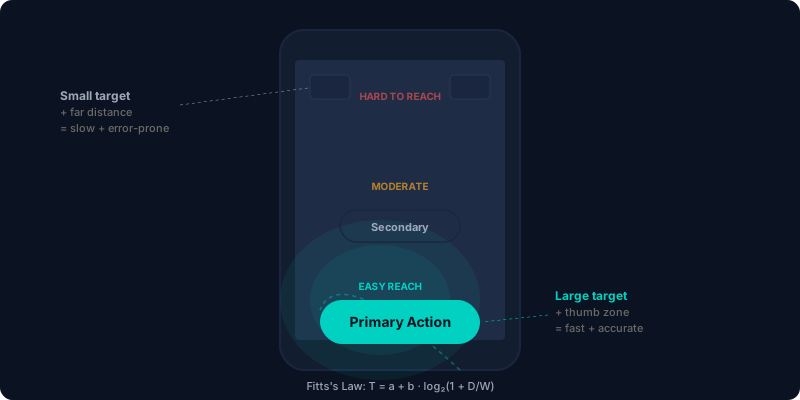
Paul Fitts published his foundational work in 1954, decades before the first GUI existed. His insight was simple but profound: the time required to move to a target is a function of the target's size and the distance to it. Bigger, closer targets are faster and easier to hit.
Fitts understood something most designers still underestimate: human error isn't always a user problem. It's often a design problem. When someone taps the wrong button on your mobile app, the question isn't "why are they clumsy?" It's "why is that target 32 pixels wide and placed next to a destructive action?"
Spotify gets this right. The Play button is the largest interactive element on screen, dramatically bigger than Skip, Shuffle, or Repeat. That's Fitts's Law in action (and visual hierarchy too): the most frequent action gets the biggest target.
On mobile, distance matters even more. The natural resting position of a thumb creates a "comfort zone," a crescent-shaped area in the lower third of the screen. Primary actions that land outside this zone require users to shift their grip, which introduces friction and increases error rates.
When we designed LinkedIn's mobile Hiring Assistant, we mapped every primary action to the thumb zone. Secondary actions moved to the upper screen. The result: recruiters completed core tasks 60% faster, not because we changed what the app did, but because we changed where it placed the things recruiters did most.
How we apply it: We size interactive elements proportionally to their usage frequency and criticality. Primary CTAs get minimum 48px touch targets on mobile (Apple's HIG recommends 44pt; we round up). We also audit the distance between related actions. A "Confirm" button 400 pixels away from the form it confirms is a Fitts's Law violation hiding in plain sight.
3. Gestalt Principles
The brain's built-in system for organizing visual information
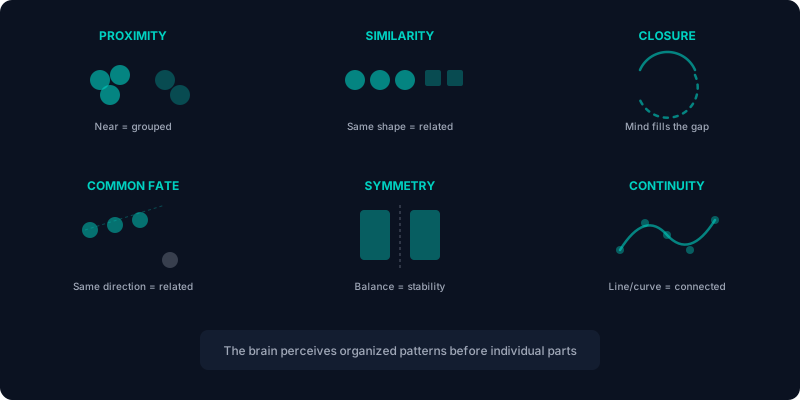
In the early 20th century, psychologists Max Wertheimer, Kurt Koffka, and Wolfgang Kohler made a discovery that still underpins every interface designed today: the human mind perceives organized patterns and whole forms before it processes individual parts. They called it "Gestalt," German for "unified whole."
This isn't a design preference. It's a perceptual mechanism. Your visual cortex is running pattern-recognition algorithms constantly, grouping elements, inferring relationships, and constructing meaning from spatial arrangement, all before your conscious mind gets involved.
There are six principles we apply consistently:
Proximity
Elements near each other are perceived as a group. This is the most fundamental layout principle, and yet teams violate it constantly. When a label is equidistant between two form fields, the brain can't determine which field it belongs to. When a button floats with equal spacing from two content blocks, its association is ambiguous. Proximity is communication, not decoration.
Similarity
We group items that share visual attributes like color, shape, size, or texture. This is why navigation items should look consistent, why actionable elements should share a visual treatment, and why breaking similarity is one of the most powerful ways to draw attention (see: Von Restorff Effect, below).
Closure
The brain fills in missing visual information to complete recognizable shapes. The WWF panda logo is a classic example. The body is incomplete, but your mind closes the gaps instantly. In interface design, closure lets you suggest structure without drawing every line. It's why card layouts don't need heavy borders. A subtle shadow or background difference is enough for the brain to perceive a contained region.
Common fate
Objects moving in the same direction are perceived as related. In web design, this applies to scroll behavior, animations, and transitions. When a form stays fixed while surrounding content scrolls away, common fate separates the form from the background, making it feel like a distinct, persistent object. Sticky elements work precisely because they violate common fate with their surroundings.
Symmetry
Symmetrical compositions feel balanced, stable, and resolved. The natural world is full of bilateral symmetry, and humans are neurologically wired to detect it. In layout design, symmetry creates a sense of order and professionalism, useful for establishing trust. Asymmetry, used intentionally, creates tension and visual interest, useful for drawing attention.
Continuity
Elements arranged on a line or curve are perceived as related and continuous. This is why horizontal scroll indicators work. A card that's partially visible at the edge of the viewport signals "there's more." It's also why Amazon's A-to-Z arrow is so effective: it guides the eye along a continuous path while subtly encoding the message "we have everything."
How we apply it: Every layout we build is stress-tested against Gestalt principles before development begins. We ask: if you squint at this screen, blurring all the text, do the groupings, relationships, and hierarchy still communicate correctly? If the answer is no, the spatial structure is doing too little work and the content is carrying too much.
4. Visual Hierarchy
Controlling the sequence of attention
When a user lands on your page, their eyes don't scan randomly. They follow a predictable path determined by visual weight, the relative prominence of elements based on size, color, contrast, spacing, and position.
Visual hierarchy is the deliberate manipulation of these properties to control what gets seen first, second, third. It's how you ensure users notice your value proposition before your legal disclaimer, your CTA before your copyright notice.
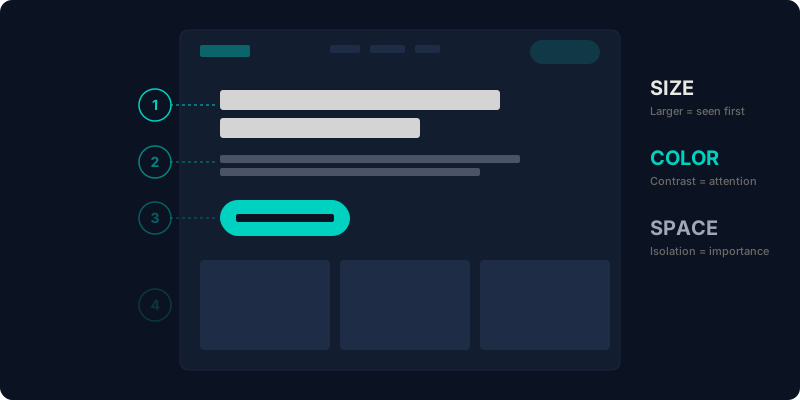
The mechanisms are well-documented:
- Size: Larger elements attract attention first. This is why hero headlines are 48–72px and body text is 16px. The ratio creates a clear reading order.
- Color and contrast: High-contrast elements pop against their surroundings. A teal button on a navy background commands attention; a gray button recedes.
- Whitespace: Isolation amplifies importance. A CTA with generous surrounding space feels more significant than one crammed between other elements.
- Position: Users typically start scanning from the top-left (in LTR languages). Content placed above the fold and toward the starting point of the scan path gets seen first.
There's also the Golden Ratio, the 1:1.618 proportion that appears throughout nature, classical architecture, and fine art. Designs that respect this ratio feel intuitively balanced. It's not magic; it's a spatial relationship the human visual system has been calibrated for over millions of years of evolution.
When we redesigned Facebook Profiles, we restructured the visual hierarchy to prioritize identity-confirming information (name, photo, mutual connections) over secondary content. Engagement depth increased 64%, not because we added content, but because we reorganized the sequence in which existing content was consumed.
How we apply it: We design at three zoom levels. At 100%, every word is readable and the content makes sense. At 50%, the hierarchy should still be clear. Headlines, sections, and CTAs should be distinguishable even when blurred. At 10%, the page should resolve into a clear structure of blocks and whitespace. If hierarchy fails at any zoom level, it's not working.
5. Occam's Razor
When two designs do the same job, the simpler one wins
William of Ockham's 14th-century principle has survived 700 years because it keeps being right: the simplest explanation, or in our case, the simplest design, is usually the best one.
This is a decision-making framework for design trade-offs, not a call for minimalism as an aesthetic choice. When two approaches achieve the same outcome, the one with fewer moving parts introduces fewer points of failure, less cognitive load, and lower maintenance cost.
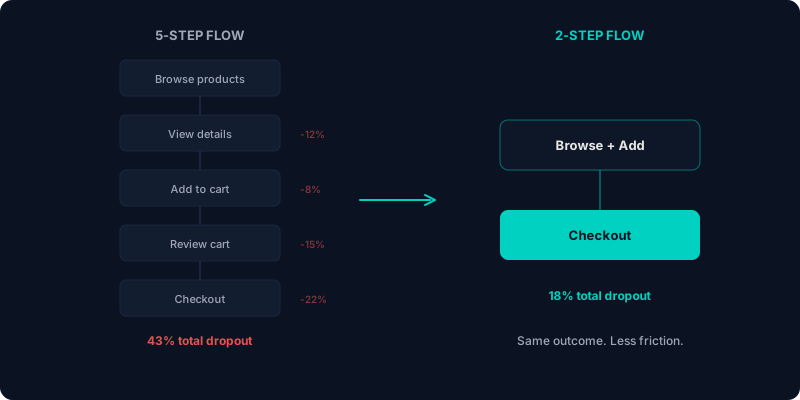
We see this most often in CTA strategy. Teams create landing pages with five buttons ("Learn More," "Watch Demo," "See Pricing," "Talk to Sales," "Read Case Study") thinking they're being helpful by offering every path. In practice, they're creating a Hick's Law violation wrapped in a visual hierarchy failure.
The most effective landing pages we've built have two CTAs: one for users ready to act, one for users who need more information. That's it. The simplicity clarifies rather than limits.
Occam's Razor also applies to navigation, onboarding flows, form design, and feature architecture. At every decision point, we ask: is this element earning its cognitive cost? If removing it wouldn't reduce the user's ability to accomplish their goal, it shouldn't be there.
How we apply it: During design reviews, we run a "subtraction test." For every element on screen, we ask: what happens if we remove this? If the answer is "nothing changes for the user," we remove it. If the answer is "the user loses context," it stays. The goal is making every element intentional, not making interfaces sparse.
6. The Von Restorff Effect
Distinctive items are remembered. Everything else is noise.
In 1933, behavioral scientist Hedwig Von Restorff demonstrated that an item that stands out from its surroundings is significantly more likely to be remembered than items that blend in. She called it the "isolation effect," and it's one of the most exploited (and most effective) principles in conversion design.
You've seen this on every pricing page you've ever visited. Three tiers, and one has a colored border, a "Most Popular" badge, and a slightly elevated card. That's Von Restorff at work. The visual distinction is a memory and attention mechanism that guides users toward a specific choice.
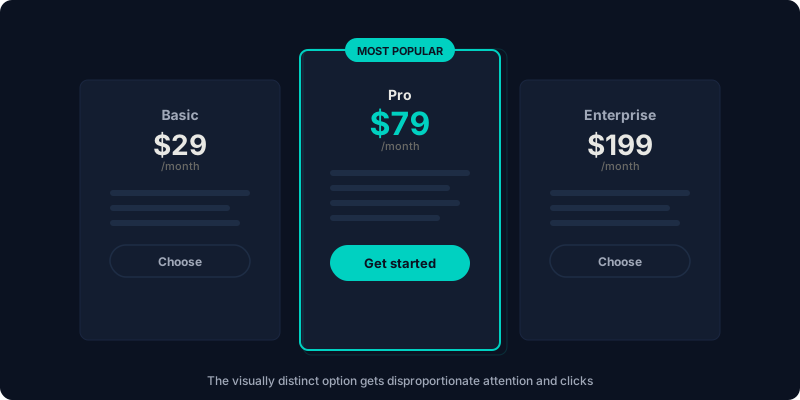
But the principle goes far beyond pricing. Every CTA button is a Von Restorff application. It works because it's visually distinct from the surrounding content. The effectiveness scales with the degree of contrast: a button that's slightly different gets slightly more attention; a button that's dramatically different commands the page.
The mistake teams make is applying distinctiveness to too many elements. When everything is highlighted, nothing is. Von Restorff only works when the distinctive item is surrounded by uniform items. Three "featured" cards in a row? That's not isolation. That's consistency.
How we apply it: We identify the single most important action on each screen and give it maximum visual distinction through color, size, isolation, or animation. Everything else gets deliberately uniform treatment. On our pricing pages, we use the Von Restorff Effect to guide users toward the plan that delivers the best value for both the user and the business.
7. The Zeigarnik Effect
Incomplete tasks create psychological tension that demands resolution
Russian psychologist Bluma Zeigarnik (a student of Gestalt psychologist Kurt Lewin) observed something fascinating in the 1920s: waiters could remember complex, unpaid orders with perfect recall, but the moment the bill was settled, the order vanished from memory. Unfinished tasks occupy mental real estate that completed tasks don't.
This creates a productive tension. The brain wants closure. It wants the incomplete pattern to resolve. And designers can use this tension ethically to encourage users to finish what they've started.
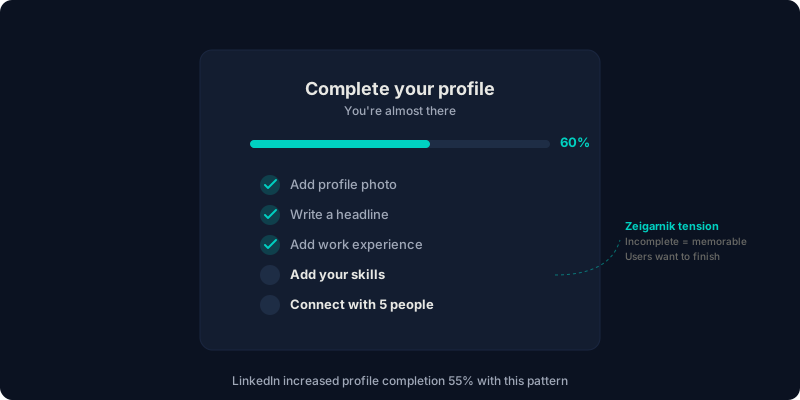
Progress bars are the most common application. A profile setup showing "60% complete" creates a cognitive itch that "100% complete" would relieve. LinkedIn famously used this to drive profile completion rates. Users who saw their "Profile Strength" meter at "Intermediate" felt compelled to reach "All-Star."
We applied this at Intuit's Learning Academy, where course completion was stuck at 45%. By adding visible progress indicators, streak counters, and a "continue where you left off" prompt, we created persistent Zeigarnik tension. Completion rates jumped to 65%, and enrollment grew by 3,000 users.
Television cliffhangers work on the same principle. You watch the next episode because the unresolved plot creates tension your brain wants to close. In product design, every multi-step flow is an opportunity to leverage the same mechanism.
How we apply it: Any flow with more than two steps gets visible progress indication. We also use the "endowed progress" variant, starting the progress bar at 10–20% rather than 0%, so users feel they've already invested effort and are less likely to abandon. This is honest acknowledgment, not manipulation: they've already made a commitment by starting.
8. Serial Position Effect & Peak-End Rule
First impressions and last impressions disproportionately shape memory
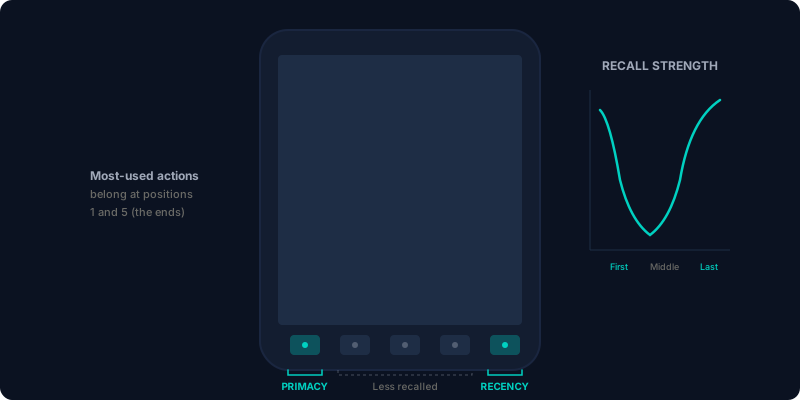
In the 1880s, psychologist Hermann Ebbinghaus discovered that items at the beginning and end of a sequence are recalled far more reliably than items in the middle. The beginning benefits from the "primacy effect" (more time for encoding). The end benefits from the "recency effect" (still in short-term memory). The middle? Largely forgotten.
This has direct implications for how you structure navigation, content sequences, and onboarding flows. The most important actions belong at the start and end of any list. Instagram places Home and Profile, its two most-used functions, first and last in its bottom navigation. The middle icons get less engagement not because they're less useful, but because of where they sit in the sequence.
The Peak-End Rule, documented by psychologist Daniel Kahneman, extends this further: people judge an experience based on its most emotionally intense moment (the "peak") and its final moment (the "end"), not on the average of every moment.
This means your worst moment matters more than most of your good moments. A smooth 10-step onboarding with one confusing error message will be remembered as a confusing experience. A checkout flow that ends with a delightful confirmation screen will be remembered more favorably than one that ends with a generic "Order placed" message.
When we designed Intuit's Virtual Expert Platform, we applied the Peak-End Rule to three moments: session start (first impression), resolution delivery (the peak), and session close (the end). These three touchpoints received disproportionate design attention because they disproportionately shape how both experts and customers remember the experience.
How we apply it: We identify the emotional peaks in every user journey, both positive and negative. Positive peaks get amplified with celebration, confirmation, and delight. Negative peaks (errors, wait times, confusion) get mitigated with clear guidance, transparency, and fast recovery. And the final moment of every flow is always designed with as much care as the first.
These principles aren't optional
Here's what I've learned after applying behavioral psychology to interfaces used by billions of people: these principles aren't design philosophies you can choose to adopt or ignore. They describe how the human brain works. Your users' visual systems are running Gestalt pattern recognition whether you designed for it or not. Hick's Law is taxing their working memory whether you've heard of it or not.
The question isn't whether these principles apply to your product. The question is whether you're working with them or against them.
Every interface we've built at Schemata Creative starts with these eight principles as the foundation. Not as a checklist to run after the design is done, but as the generative framework that shapes decisions from the first wireframe. When you design from psychology rather than checking against it, the results show up in every metric that matters: conversion, retention, satisfaction, and time-on-task.
The science is clear. The application is the hard part. That's what we do.
Ready to apply behavioral science to your product?
We audit your critical flows against these principles and identify exactly where psychology is working against your conversion goals.
Start a conversation