April 15, 2026
10 min read
The Psychology of Trust in UI Design
Users don't trust your product because it's secure. They trust it because it feels secure. The distinction is everything, and most teams get it backwards. Here's what the research actually says about how trust forms, breaks, and rebuilds in digital interfaces.
Trust is a cognitive shortcut
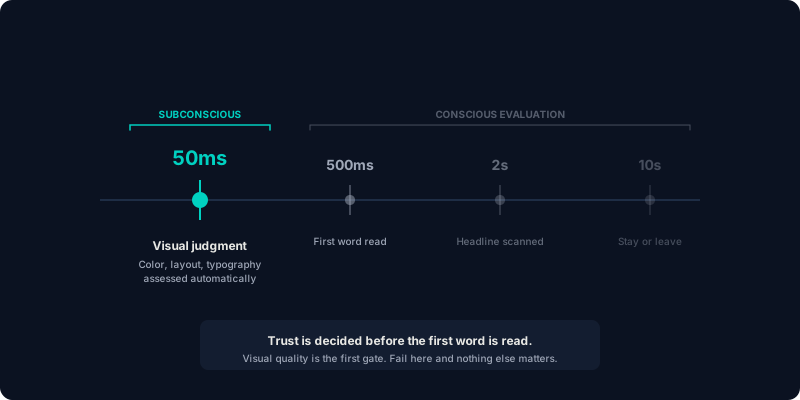
When a user lands on your interface for the first time, their brain runs an unconscious calculation. Within 50 milliseconds, before they've read a word, the visual cortex has already made a trustworthiness judgment based on layout quality, color harmony, and typographic professionalism (Lindgaard et al., 2006).
This snap judgment is adaptive, not irrational. In a world with infinite options and finite attention, visual quality serves as a proxy for organizational competence. A polished interface signals "this company cares about details." A rough one signals "proceed with caution."
This is why design quality is the first gate in the trust evaluation pipeline. If you fail here, users never reach your value proposition.
The six trust signals
Based on our work across fintech (Coinbase), enterprise (Intuit), and social platforms (Meta, LinkedIn), we've identified six categories of trust signals that consistently predict whether users convert or abandon.
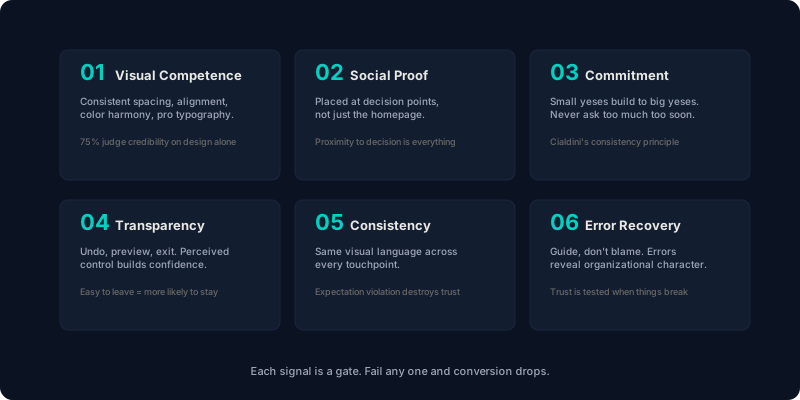
1. Visual competence
Consistent spacing. Aligned elements. Harmonious color. Professional typography. These are trust prerequisites. Research from the Stanford Web Credibility Project found that 75% of users judge a company's credibility based on visual design alone.
This doesn't mean "make it pretty." It means make it precise. Users can't articulate why a misaligned button feels untrustworthy, but they can feel it.
2. Social proof at decision points
Social proof works, but placement matters more than content. A testimonial on your homepage is nice. A testimonial next to your pricing table, right where purchase anxiety peaks, is a conversion mechanism.
At Intuit, we placed social proof ("87% of top-rated experts use this approach") directly within the AI recommendation interface. Expert adoption jumped from 45% to 88%. Same content, different placement, radically different outcome.
3. Progressive commitment
Asking for too much too soon violates the commitment and consistency principle (Cialdini, 1984). Users who make small initial commitments like saving a preference, completing a profile step, or bookmarking a feature are psychologically invested and significantly more likely to complete larger commitments later.
This is why the best onboarding flows don't ask for payment on step one. They build a series of small "yes" moments that make the final "yes" feel like a natural continuation rather than a leap.
4. Transparency and control
Trust requires perceived control. When users feel they can't undo an action, can't understand what will happen next, or can't find an exit, anxiety spikes and trust collapses.
Design patterns that build control: clear "undo" options, explicit previews before destructive actions, visible progress indicators, and, critically, obvious ways to leave. Paradoxically, making it easy to leave makes users more likely to stay.
5. Consistency across touchpoints
Inconsistency is a trust-destroyer. If your marketing site looks premium but your product feels clunky, users experience expectation violation, a psychological state that triggers heightened scrutiny of everything that follows.
This is why we build design systems, not just designs. When every touchpoint (marketing site, product UI, email, documentation) shares the same visual language, users develop procedural trust. They know what to expect, and predictability is the foundation of trust.
6. Error recovery
Trust isn't tested when everything works. It's tested when something breaks. How your interface handles errors, edge cases, and user mistakes reveals more about your organization than any "About Us" page ever could.
The difference between "Error 422" and "That email is already registered. Would you like to sign in instead?" is the difference between an interface that blames users and one that guides them. The second version preserves trust. The first one destroys it.
"Users don't remember features. They remember how your product made them feel when something went wrong."
Trust asymmetry: easy to lose, hard to rebuild
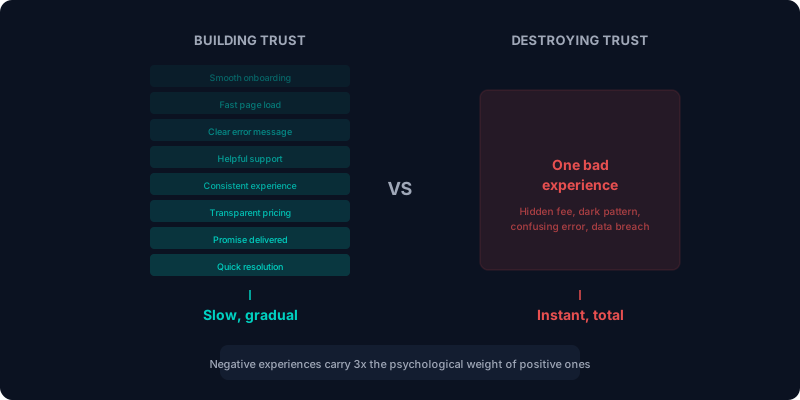
Here's the uncomfortable truth: trust is asymmetric. It takes dozens of positive interactions to build and a single negative one to destroy. Psychologists call this the "negativity bias." Negative experiences carry roughly 3x the psychological weight of positive ones.
This means your worst interaction matters more than your best one. A single confusing error message, an unexpected charge, a dark pattern. These are trust-destroying events that users remember and share.
In our work redesigning SmugMug's checkout, we discovered that purchase anxiety peaked at two specific moments: entering payment information and confirming the order. We placed trust signals (security badges, satisfaction guarantees, clear refund policies) at exactly those points. Cart abandonment dropped 34%.
Designing for trust, practically
If you take one thing from this article, let it be this: trust isn't a section of your interface. It's a property of every interaction.
Audit your critical path: signup, onboarding, checkout, whatever your conversion event is. At each step, ask:
- Does this step feel visually competent and professional?
- Is there social proof near the biggest decision?
- Am I asking for an appropriate level of commitment at this stage?
- Does the user feel in control? Can they undo, preview, or exit?
- Is this consistent with every other touchpoint they've seen?
- If something goes wrong here, does the interface guide or blame?
If any answer is "no," you've found a trust leak. And trust leaks are conversion leaks.
Find the trust leaks in your product
Our behavioral audits identify exactly where trust breaks down in your critical path, and how to rebuild it.
Book a behavioral audit